

 Oven Touch Panel
 Taps
Taps AC Motors
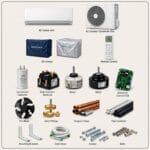 Ac Parts
 Fridge parts
Warranty Policy
Warranty Policy — Complete and Separate
1) Overview
- Coverage
- This warranty covers manufacturing defects and functional failures under normal use.
- Remedy
- We will repair the item or replace the faulty component/board at our discretion.
- Limitations
- Exchange-only store policy applies; no refunds.
2) Eligibility Requirements
- One-time claim limit
- Warranty can be claimed only once per product (single warranty claim per item).
- Warranty card
- A valid, original Warranty Card must be provided with each claim.
- Security/Intact sticker on PCB
- The original intact sticker/seal on the PCB must be present and unbroken.
- If the sticker/seal is broken, removed, tampered, or the signature/ID is mismatched, the warranty is void and cannot be claimed.
- Proof of purchase
- Order ID, invoice, and date of purchase are required.
- Condition
- Product must be free from physical/liquid damage and not altered or repaired by third parties.
3) What’s Covered
- Manufacturing defects
- Component failure under normal use.
- Functional issues
- Non-working or intermittent performance caused by internal component faults.
- Parts and labor
- Diagnostic and repair labor; replacement of faulty components as needed.
4) What’s Not Covered
- Physical and liquid damage
- Cracks, dents, burn marks, corrosion, or any liquid ingress.
- Misuse or improper handling
- ESD/static damage, over-voltage, short circuits due to installation errors, or use outside specification.
- Tampering
- Removed/altered serials, missing warranty card, broken/missing intact sticker, or mismatched signatures/IDs.
- Unauthorized repair/modification
- Any third-party soldering, reballing, jumper wires, or altered components.
- Normal wear and consumables
- Cosmetic wear, connectors worn by handling, or accessories not originally supplied.
5) Warranty Duration
- Coverage period
- As stated on your invoice or product page for the specific item/variant.
- Start date
- Warranty starts on the invoice date.
- Claim limit
- Only one claim per product within the coverage period, even if repaired/replaced.
6) How to Claim Warranty
- Prepare documents
- Warranty Card, invoice/order ID, product photos (including intact sticker), and a short issue description.
- Contact support
- Share details via our support channel to obtain a Case/Exchange ID.
- Send for inspection
- Ship the product to our service address. Packaging must protect against ESD and transit damage.
- Inspection and decision
- Our technicians will test the product. If a manufacturing fault is confirmed, we will repair or replace the faulty component/board.
- Return shipment
- After service, we ship the product back to you.
- Important
- All shipping/delivery charges (to and from our facility) and any price differences are paid by the client.
- Processing begins after we receive the item.
7) Client Responsibilities
- Accurate information
- Provide correct model details and problem description.
- Safe packaging
- Use ESD-safe packaging and adequate padding; damage in transit is not covered.
- No tampering
- Do not remove or alter the intact PCB sticker/seal; do not attempt repairs.
8) Our Responsibilities
- Fair assessment
- Perform diagnostics and share the outcome of inspection.
- Remedy execution
- Repair or component replacement within a reasonable time frame, subject to parts availability.
- Communication
- Provide updates during assessment and service.
9) Special Conditions
- Out-of-stock or obsolete items
- We may offer an equivalent component/board at our discretion. Any cost difference is paid by the client.
- Data and calibration
- We are not responsible for user data, device pairing, or calibration lost during service.
- Multiple faults
- If non-covered damage is found (e.g., liquid/ESD), the claim is rejected. Paid repair may be offered when feasible.
10) Quick FAQ
- Is there a return or refund?
- No. We operate on an exchange-only basis.
- How many times can I claim warranty?
- One-time claim per product within the warranty period.
- Do I need the Warranty Card and intact sticker?
- Yes. Both are mandatory. Broken/tampered sticker or mismatched sign/ID voids warranty.
- Who pays shipping?
- The client pays all shipping/delivery charges both ways.
- What if the exact part is unavailable?
- We will propose an equivalent option; price differences are paid by the client.
Short Snippets for Product Page
- Warranty claim: one-time only per product.
- Warranty Card and intact PCB sticker are mandatory.
- Broken/tampered sticker or mismatched ID voids warranty.
- Warranty covers repair or component replacement only.
- Client pays shipping both ways for warranty service.
Printable Warranty Card — Template
- Front Side (Customer Copy)
- Product Name: _______________________________
- Model / Part No.: ____________________________
- Serial / Sticker ID (on PCB): __________________
- Order ID / Invoice No.: _______________________
- Purchase Date: ____ / ____ / ______
- Customer Name: ______________________________
- Customer Contact (Phone / Email): ______________
- Seller / Dealer Name: _________________________
- Seller Stamp / Sign: __________________________
- Warranty Period: ______________________________
- Claim Note: This warranty is valid for one-time claim only. The original intact PCB sticker/seal and this Warranty Card are mandatory. Any broken, tampered, or mismatched sticker/ID will void the warranty.
- Back Side (Service / Company Copy)
- Case / Exchange ID: ___________________________
- Received Date (by Service): ____ / ____ / ______
- Condition on Receipt (tick):
- Seals/intact sticker present
- Packaging undamaged
- Visible physical/liquid damage
- Issue Reported by Customer: ___________________
- Inspection Findings: ___________________________
- Service Action (tick):
- Repaired — Parts Replaced: __________________
- Component/Board Replaced — Part No: _________
- Claim Rejected — Reason: ___________________
- Service Completion Date: ____ / ____ / ______
- Technician Name & Sign: _______________________
- Return Shipment Tracking No.: ___________________
- Notes / Next Steps: ____________________________
- Instructions for Use
- Keep Customer Copy safe. Present it for any warranty claim.
- Do not remove or tamper with the PCB sticker/seal. Tampering voids warranty.
- For warranty claims, ship the product with this card and proof of purchase to the service address provided by support.
- Client pays shipping both ways and any price differences if applicable.
- Print & Layout Recommendations
- Page size: A4 (210 × 297 mm) or Letter (8.5 × 11 in).
- Use two-sided printing: Front = Customer Copy, Back = Service Copy.
- Suggested font size: 11–12 pt for fields, 9–10 pt for notes.
- Leave blank lines or boxes for handwriting (see template above).
- Add your company logo and contact details at top if desired.
- Ready-to-Use Text Block (copy-paste into a document)
- Front Title: WARRANTY CARD — CUSTOMER COPY
- Fields: Product Name / Model / Serial/Sticker ID / Order ID / Purchase Date / Customer Name / Contact / Seller / Seller Stamp / Warranty Period
- Mandatory Note: “This warranty is valid for one-time claim only. The original intact PCB sticker/seal and this Warranty Card are mandatory. Broken/tampered/mismatched sticker or ID voids the warranty.”
- Back Title: WARRANTY CARD — SERVICE COPY
- Fields: Case ID / Received Date / Condition on Receipt / Issue Reported / Inspection Findings / Service Action / Completion Date / Technician Sign / Return Tracking / Notes
If you want, I can:
- Generate a ready-to-print PDF of this Warranty Card (two-sided) — enable Document generating mode.
- Or provide a ready-to-use Word/Google Docs layout (with table boxes) you can copy into your editor. Which do you prefer?